

Your Messy SharePoint Is Not a SharePoint Problem

By Trey Bayne | Senior Solution Architect, Blue Mantis
You know the pause.
You’ve just finished a document, an email, a meeting note, something worth keeping, and now you have to decide where it goes. Clients/Acme/2026/ or Deals/Closed/Q2/? Under the project name or the client name? Your own working folder or the shared drive? You sit there for a second, pick one, and move on. Maybe you make a mental note to clean it up later.
You don’t.
Multiply that pause by every knowledge worker in your company, every day, for the last twenty years, and you start to see the size of what folders have been quietly costing you. Not in storage. In meaning.
The thing folders were doing
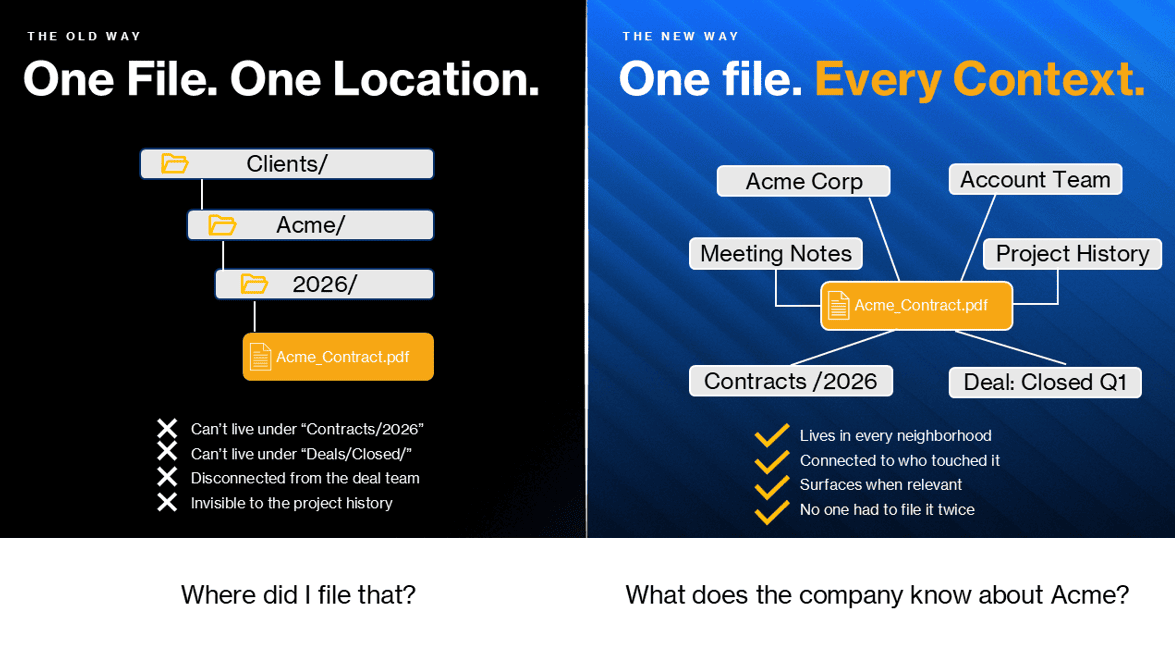
Here’s what I’ve come to understand after years of helping organizations get more out of their data: folders were never really about storage. They were about meaning. When you dragged that file into Clients/Acme/, you were doing three jobs at once: putting it somewhere, telling future-you what it was, and signaling to colleagues how it relates to everything else. The folder was a one-bit assertion of context, made by a human, at the moment of filing, and then frozen in place.
That model is ending. Not because folders are inefficient, but because they were a workaround for a problem we no longer have: machines that couldn’t understand the contents of a document. The workaround was to make humans label everything, by hand, by dragging files into trees. We’ve been doing that workaround so long we forgot it was one.
I see this every time I sit down with a new client. Someone always says “our SharePoint is a disaster.” I tell them it’s not a SharePoint problem. It’s a filing problem. And filing is a people problem. The folder forced one answer to a question that always had many.
Why hierarchies always lied a little
Is the Acme contract filed under the client, the contract type, the year, or the deal? Folders force you to pick one. The honest answer was always all of them.
There’s a phrase I borrow from the people who build knowledge graph systems: things, not strings. A folder treats “Mercury” as a label, a string of characters. It can’t tell you whether that folder is about the element, the planet, the car, or the Roman god. A knowledge graph treats Mercury as a thing, with relationships. This Mercury connects to chemistry papers. That Mercury connects to NASA missions. Same word, four different neighborhoods, no confusion.
The folder was always pretending the world was simpler than it was. The knowledge graph just stops pretending.
What’s replacing them
A knowledge graph sits between two tools you already have but that don’t talk to each other well.
It isn’t the AI assistant on your phone. That tool has come a long way, and yes, it can now read your inbox and check your calendar when you ask it to. But it’s working on your slice: your email, your meetings, your photos, pulled in the moment you ask. Useful, but personal in scope.
It also isn’t your data warehouse. The warehouse knows the organization’s Tuesday in extraordinary detail, but only the parts that fit into rows and columns. Ask it an unstructured question and you need someone to write a query first.
A knowledge graph sits between the two. It holds the organization’s real material, documents, conversations, decisions, people, projects, and tracks how all of it connects, in advance. The contract belongs to that client. That client is owned by this account team. That team had a meeting last Thursday, where a decision was made that affects this deliverable. The relationships are standing infrastructure, not something a human has to reconstruct every time by clicking through folders.
What that buys you is a different kind of question. Instead of “where did I file that?” you can ask “what does the company know about this client?” and get an answer that draws on the contract, the meeting notes, the support tickets, the project history, and the people who touched any of it. All at once, without anyone needing to write a query or remember which system to check.
The unglamorous work underneath
A fair question at this point: if all of that data is connected, how does it not turn into a mess?
It’s a real question, and I’ll give you a direct answer. There’s an unglamorous layer of work happening underneath any system like this. Permissions from each source system have to carry through, so a sensitive contract doesn’t surface for someone outside the deal team just because the graph technically could surface it. Someone has to make judgments about what counts as signal. Feeding in every old draft, abandoned proposal, and cancelled-meeting deck doesn’t produce organizational memory. It produces organizational noise.
This work used to be handled, badly, by the folder system itself. People knew not to put sensitive files in shared drives. People kept working copies separate from canonical ones. The structure encoded a lot of tacit governance. When the structure goes away, that governance gets made explicit. It falls to people whose job it is to tend the connections so the rest of us don’t have to think about them.
That is the governance and process layer. And it’s the part most organizations skip because it’s not in the vendor demo.
What changes for you
Folders aren’t dying. They’re being demoted. From the interface everyone interacts with, to plumbing a few people maintain. End users stop seeing them. The cognitive tax of “where does this go?” disappears.
What replaces it is something more useful: the ability to ask the company a question and get an answer that draws on everything the company knows. Not your slice. Not the rows-and-columns slice. The whole picture, assembled on demand, from material that was always related. We just never had a way to reach it as a whole before.
I’ve seen organizations get real leverage from this shift. I’ve also seen organizations buy the platform, skip the governance work, and end up with a smarter version of the same mess. The technology is not the hard part. Deciding what the company’s knowledge should look like, who tends it, and who can reach it is the hard part.
If you’re not sure where to start on that question, that’s usually the right place to begin the conversation.
About the Author
Trey Bayne
Senior Solution Architect, Blue Mantis
Trey Bayne is a Senior Solution Architect at Blue Mantis and a business-first technologist with nearly two decades of experience across data analytics, cloud architecture, and advisory services. He has worked with organizations ranging from regional institutions to large enterprises across financial services, insurance, manufacturing, and professional services. At Blue Mantis, Trey helps clients evaluate and implement modern analytics platforms including Microsoft Fabric, Power BI, and cloud data architectures, while navigating the legacy constraints and operational realities that come with real organizations. He believes technology should simplify organizations, not complicate them.